Unlock immediate liquidity with ETH Offchain Vault Transfers on Coinbase Prime. Clients staking ETH can transfer an entire staked ETH vault to a counterparty within the Prime platform, with settlement occurring off‑chain in minutes.
All transfers are automatically reflected in statements for both sender and recipient. The functionality supports flexible settlement: the sender can transfer staked ETH, and the counterparty can provide payment in spot ETH or any other asset supported by Prime transfers.
About Offchain Vault Transfers
As a Coinbase Prime client, you can transfer the ownership of a staked vault to another portfolio papered to the same Coinbase Custody entity.
This process follows the same approval and activity logging workflow as a standard funds transfer, including consensus approval, detailed activity records, and security controls. Vault transfers are supported for wallets with a non‑zero staked balance and will move:
Staked balances
Non‑staked balances
Pending rewards balances
Important restrictions:
Transfers are only allowed between portfolios contracted to the same Coinbase Prime entity (e.g., CCTC → CCTC, CBLU → CBLU)
Cross‑entity transfers (e.g., CBLU → CCTC) are not supported
Partial transfers are not supported
Only available for wallets with ETH staked to Pectra-enabled validators (so-called 0x02 validators)
ETH Offchain Vault Transfers currently operate only as one‑way transfers. To receive payment in return for your transfer, you must have a separate agreement in place with a liquidity provider.
Before You Begin
Enter into an agreement with a participating liquidity provider.
Ensure the destination CTN ID is whitelisted in your Trusted Address Book.
Navigate to Settings → Address Book in Prime to add a trusted CTN ID.
If you are adding a new address to your Trusted Address Book, allow for the 48‑hour security approval period before initiating the transfer.
Confirm that the vault’s entire balance will be transferred - partial transfers are not supported.
ETH Offchain Vault Transfers currently operate only as one‑way transfers. To receive payment in return for your transfer, you must have a separate agreement in place with a liquidity provider.
From the Asset Detail Page on either the Overview or Staking tab:
1. Select the 3 vertical dots on the right side of the row of the desired wallet.
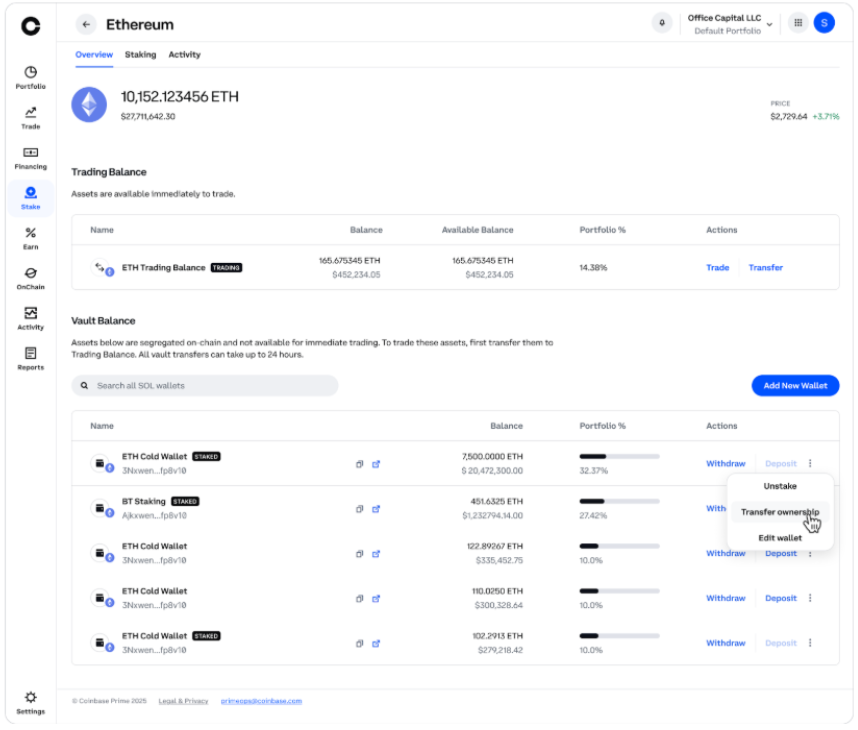
2. Select Transfer Ownership.
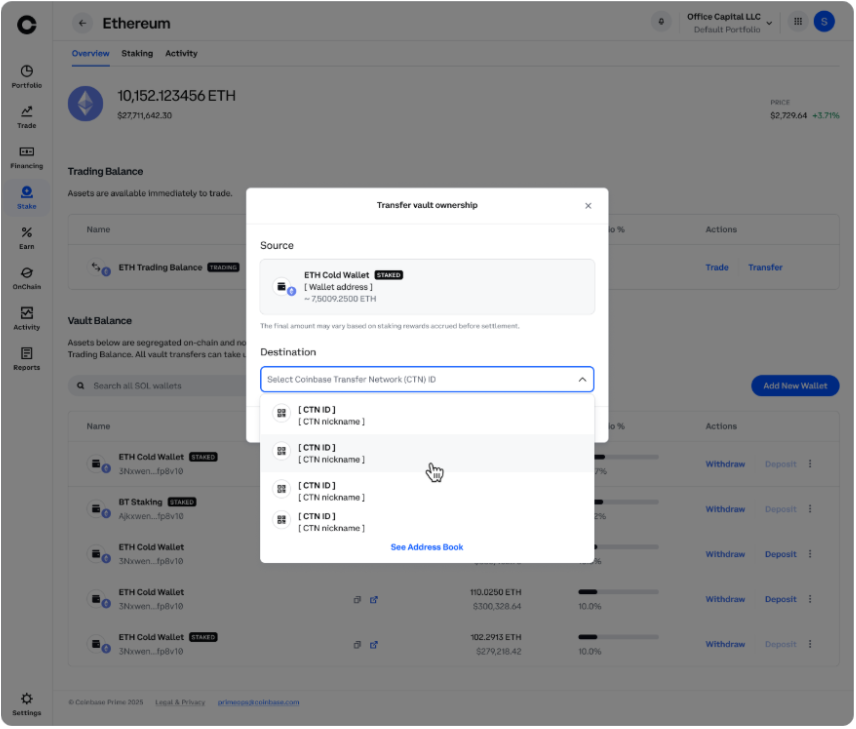
3. Review the auto‑populated source details (Wallet Name, Address, Total Balance).
4. Enter or select the destination CTN ID from your Address Book and click Confirm ID to see destination details.
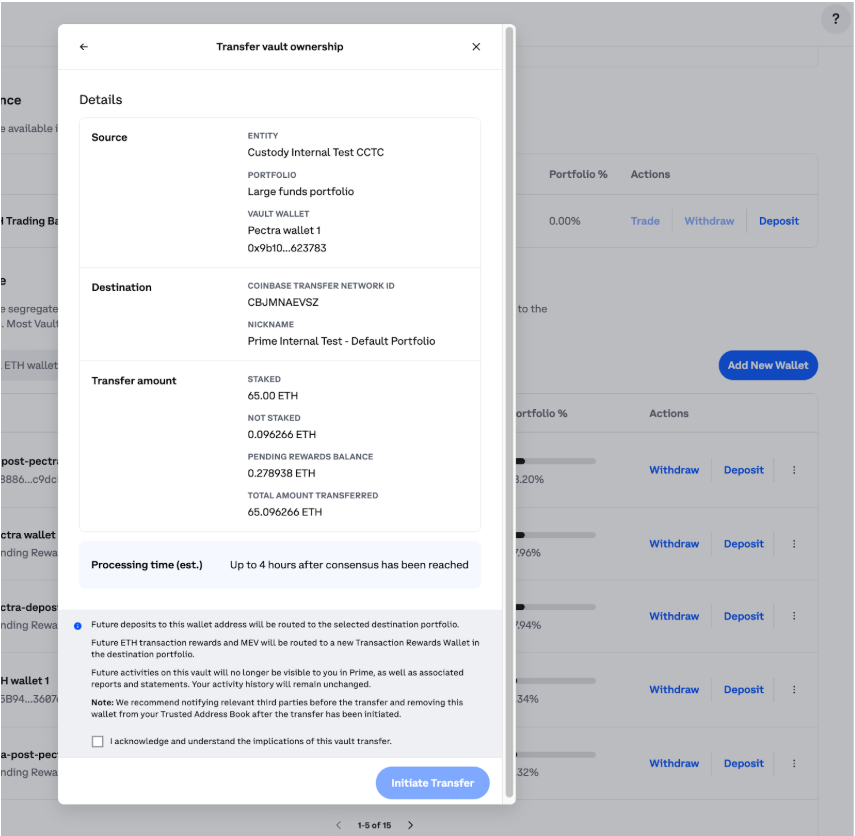
5. Review disclaimers regarding deposit routing, activity visibility, and ETH rewards.
6. Click Preview Transfer to review all transfer details.
7. Click Initiate Transfer to begin the consensus approval process.
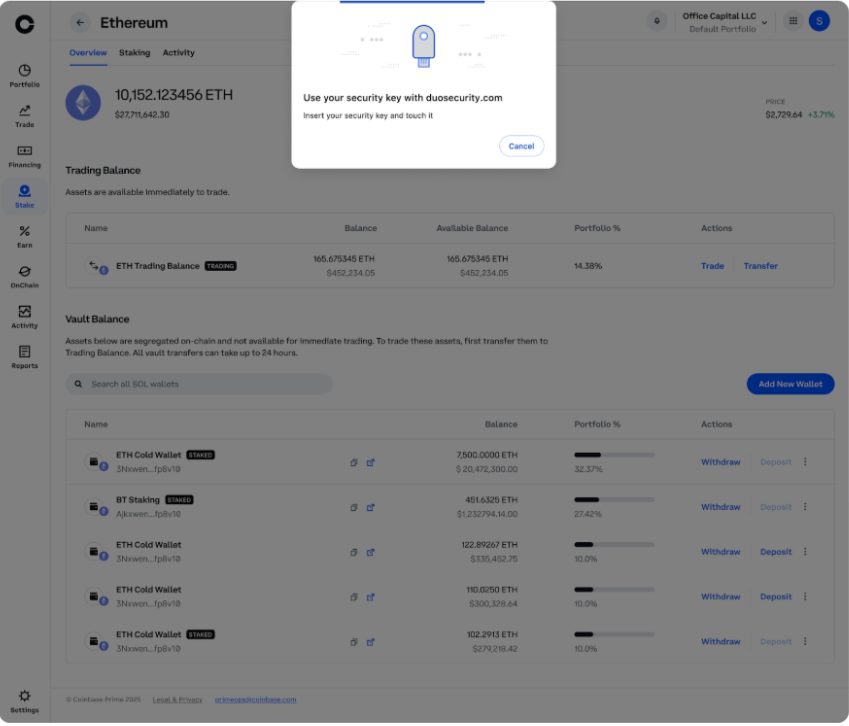
8. Verify identity via YubiKey.
9. After reaching consensus, balances and rewards are re‑ledgered to the destination portfolio and future rewards are routed to its Transaction Rewards Wallet.
During an offchain vault transfer, both the source and destination portfolios show a “VAULT IN TRANSFER” status with wallet actions disabled until completion.
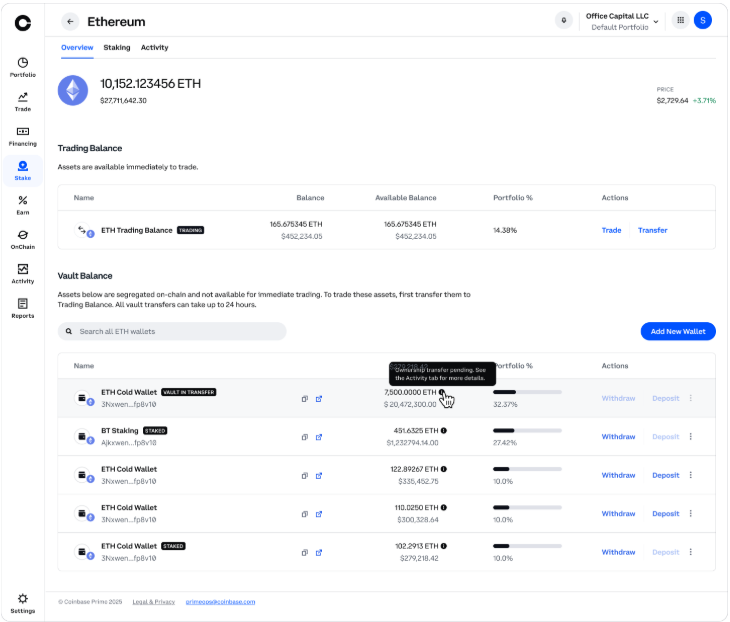
After settlement, the source vault remains visible but empty with historical activity up to the transfer date, while the destination vault appears under an auto‑generated name with new activity and rewards starting from that date.
Prime Activity logs the transfer under two new transaction types (Outbound Vault Transfer and Inbound Vault Transfer) with full details, amount breakdowns, and timeline milestones.
Tax Considerations
Sender closes the position with no realized gain/loss.
Receiver opens a new position with a cost basis of zero (user input required).
No IRS reporting.
Please consult a tax professional for further tax guidance.
Blog Post: Unlocking Staked Liquidity on Coinbase Prime
Feel free to reach out to your account manager or Prime Client Services at primeop@coinbase.com for more information.