Coinbase offers a Bulk Cost Basis Update feature for Prime Tax Managers to update missing cost basis information across multiple tax lots at once. Using a downloadable CSV template, you can fill in missing information offline, and upload the completed file to update your records in one step.
This streamlined workflow helps ensure your tax reporting is accurate and complete. You can access this feature in the Taxes tab at accounts.coinbase.com.
How to Use the Bulk Cost Basis Update Feature
Navigate to the Taxes tab.
Accessed through accounts.coinbase.com, the Taxes tab provides a centralized page guiding you through the cost basis update process.
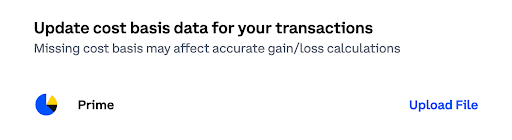
If you have any tax lots with missing cost basis information, you will see this option pop up:
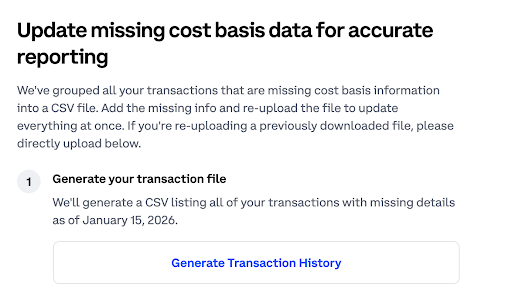
Generate your entity’s transaction history.
When you enter the flow, you will see the ability to ‘Generate Transaction History’. This generates a downloadable CSV file listing all of your entity’s transactions with missing cost basis information as of the time of generation.
Wait for transaction history generation confirmation.
Depending on how many transactions there are, the generation process may take some time. You will receive an email notification when the generation is complete, or you can stay on the page as well.
Download your transaction history.
Navigate back to this step, and then you will see the ability to download your transaction history.
Fill in the missing fields.
Complete only the blank fields in the CSV file. Do not modify any other columns.
Date of Acquisition
Enter the date you acquired the asset.
Format must be YYYY-MM-DD.
Date must be in UTC.
Cost Basis (USD)
Enter the total purchase price in U.S. dollars, up to 18 decimal points.
Input must be numeric.
Do not include currency symbols or commas.
Upload your file.
Re-upload the CSV file once you’ve added the missing values.
You do not need to update every tax lot in the file—partial updates are allowed.
After you upload, our system will validate that the file is a properly formatted CSV.
Receive confirmation.
You will receive an email notification once your cost basis update has finished processing.
Common Errors & How to Fix Them
Uploaded more than 25,000 tax lots.
Resolution: Reduce the file to 25,000 rows or fewer and re-upload.
Successfully uploaded inaccurate data.
Resolution: Re-upload updated, correct data with the same tax lot identification details (i.e., tax lot identifier, asset, amount, portfolio ID).
Cost basis field is empty.
Resolution: Enter a cost basis value for each updated tax lot.
Cost basis is not a valid decimal.
Resolution: Enter a numeric value only (no symbols or commas).
Acquisition date field is empty.
Resolution: Add an acquisition date for the tax lot.
Acquisition date is not a valid date.
Resolution: Ensure the date is in YYYY-MM-DD format and in UTC.