How to hide a token in my Base wallet
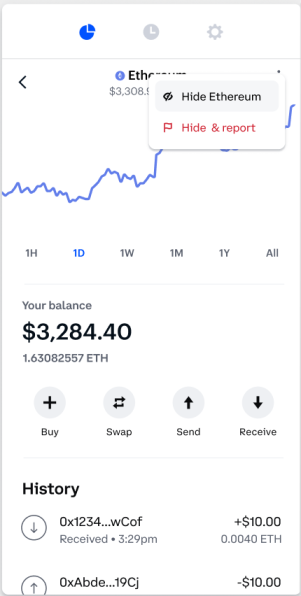
To hide a token or NFT asset from your Base wallet:
Open your Base app and navigate to Assets.
Select the token or NFT you would like to hide.
Select the more menu and choose the option to hide the asset.
You may also select Hide & Report to report the asset to Coinbase.
You will receive a confirmation that the asset is now hidden and/or reported.
To unhide or review a list of hidden token or NFT assets in your Base wallet:
Select Settings in the Base app.
Select Hide assets.
Review the list of assets and select the token or NFT you would like to unhide.
Click the eye icon to the right of the asset and select Unhide.
The asset will now reappear in your home wallet screen.
Spam tokens
The Base app will automatically hide assets from your home screen that are determined by Coinbase to be spam. If you believe this was done in error, you can review the list of assets categorized as spam in your Settings under the Hide Assets view. You can use the above steps to unhide a desired asset.
Low Balances
In your Hide Assets view in your Base wallet settings, assets with a low balance are auto populated for your convenience. You can choose to hide or show these assets in your main asset view.
NOTE: Assets that are hidden are still present in your Base wallet. Hiding the assets simply removes them from view in your home asset screen.
Revoke token approvals
Token approvals are permissions granted to dapps to access tokens in your wallet. Once granted, token approvals allow the dapp to withdraw users’ tokens and NFTs. This is how you interact with a dapp on the blockchain.
If you connect your wallet to a malicious dapp you run the potential of having your assets drained from your wallet.
You can now revoke these permissions from dapps directly within your wallet.
Note: Linking and unlinking your wallet with a dapp consist of an on-chain transaction and cost network fees to do so.
To revoke token approvals, visit Settings > Token Allowances > [Tokens or NFTs tab] > Revoke.