For legal, compliance, and fraud-prevention purposes, Coinbase requires identity verification at account creation and periodically for recordkeeping. Accounts have limited functionality until verification is complete.
Recognize identity verification requests
Identity verification requests display in the Coinbase app or in a browser after signing in to your account. Some customers may receive a verification email.
To help keep your account secure:
Sign in to Coinbase and check your account before opening links in emails.
Legitimate Coinbase identity verification flows may use these Coinbase-owned domains:
coinbase.com and localized variants (coinbase.com/*).
identification.coinbase.com, which hosts secure identity verification pages on behalf of Coinbase.
Before uploading your ID, check that the page URL ends in .coinbase.com.
Coinbase will not ask you to complete identity verification or upload documents on non-Coinbase domains, even if they use the Coinbase name or logo. Do not email ID photos to Coinbase Support.
Start the identification process
Locate one of the identity verification documents for your country from the list below.
Sign in to Coinbase.
When prompted, select Verify your info.
Follow the instructions to upload your ID.
After successful completion of the identification process, you’ll receive notification of the review status within 24 hours.
Note: Documents sent by email will not be accepted.
Use another device to complete verification
Some desktop or laptop devices cannot complete identity verification because they do not have a camera or camera access is blocked. In these cases, you may see an option to continue on your phone using a QR code.
To use another device to complete verification:
Sign in to your Coinbase account on the device that requested verification and follow the prompts until the flow tries to access your camera.
Wait on the verification page; if the device cannot use a camera for document capture, a QR code may appear with messaging such as “Continue on your phone.”
Open the camera app or a QR-scanning app on your phone or tablet and point it at the QR code on the device where you started the process.
Select the banner or link that appears on to open the identity verification page in your browser.
To complete ID and selfie capture, follow the instructions on your device to capture your ID and selfie using the camera, then submit the verification.
To finish the original task, return to the app or browser where you started verification and follow any remaining prompts.
The QR code and identity verification page are tied to your active verification session. If you wait too long before scanning or try to reuse an old code, the session may expire causing you to restart verification.
Accepted EU/EEA identity documents
EU-issued passport
EU-issued driver’s license
EU-issued national identity card
Driver’s license, passport, ID or card from the supported countries listed in the section Foreign ID documents are accepted
We may also ask you to upload your proof of address using one of the following documents:
Bank statement
Credit card statement
Utility bill
Note: The issuing date of the proof of address document must be within 3 months of submitting it to Coinbase.
As part of regulatory requirements, an address is required on the ID document you provide to proceed with onboarding. If you’re asked to re-submit an ID, it's because your ID doesn’t have an address, or your country doesn’t have Proof of Address support.
Your document must be in English or Latin scripts
Review country-specific identity document details below
Accepted identity documents
Driver's license
Passport
National ID Card
Foreign Driver’s License, Foreign Passport, Foreign ID Card from the supported countries below
Note: Customers in Hong Kong can only submit a Hong Kong passport or Foreign passport from the supported countries below.
In some cases we might also ask you to upload your Proof of Address using one of the following documents:
Bank Statement
Credit Card Statement
Utility Bill
Note: The issuing date of the Proof of Address document must be within 3 months of submitting it to Coinbase.
Country-specific identity documents details
Signup country or region | Identity documents | Supported Proof of Address (PoA) documents | Language supported |
|---|---|---|---|
Albania Angola Armenia Bahrain Bangladesh Barbados Benin Bolivia Burkina Faso Cambodia Cameroon Congo (Brazzaville) Cote d'Ivoire El Salvador Gabon Honduras Israel Kazakhstan Kyrgyzstan Macedonia Malaysia Maldives Moldova Mongolia Morocco Mozambique Nepal Niger Pakistan Paraguay Saint Lucia Sri Lanka Thailand Togo Trinidad and Tobago Tunisia | • Driver's license • Passport •National ID card • Foreign passport | Not available | English |
Algeria Argentina Bermuda Cayman Islands Chile Colombia Costa Rica Dominican Republic Ecuador Egypt Ethiopia Ghana Guatemala Indonesia Jamaica Kenya Kuwait Mexico Nigeria Panama Peru Saudi Arabia Senegal Serbia South Africa Turkey Ukraine Virgin Islands (British) | • Driver's license • Passport •National ID card • Foreign passport | • Credit card statement • Bank statement • Utility bill | English |
Vietnam | • Driver's license • Passport •National ID card • Foreign passport | • Credit card statement • Bank statement • Utility bill | English |
United Arab Emirates | • Passport | • Credit card statement • Bank statement • Utility bill | English, Latin Scripts |
Hong Kong | • Passport • Foreign passport | • Credit card statement • Bank statement • Utility bill | English,Traditional Chinese |
Taiwan Philippines | • Passport • Foreign passport | • Credit card statement • Bank statement • Utility bill | English |
Korea (South) | • Passport • Foreign passport | Not available | English |
Foreign passports are accepted from these countries
Botswana, Cape Verde, Gabon, Gambia, Lesotho, Mauritania, Mayotte, Namibia, Reunion, Rwanda, Saint Helena, Seychelles, Sierra Leone, South Africa, Swaziland, Western Sahara
Armenia, Bahrain, Bhutan, British Indian Ocean Territory,
Brunei Darussalam, Christmas Island, Cocos (Keeling) Islands, Hong Kong, Indonesia, Israel, Japan, Kazakhstan, Korea (South), Kuwait, Macau, Malaysia, Maldives, Nepal, Oman, Qatar, Sao Tome and Principe, Singapore, Taiwan, Timor-Leste
Aland, Andorra, Austria, Belgium, Bosnia and Herzegovina, Bulgaria, Croatia, Czech Republic, Denmark, Estonia, Faroe Islands, Finland, France, Georgia, Germany, Greece, Greenland, Guernsey, Hungary, Iceland, Ireland, Isle of Man, Italy, Jersey, Liechtenstein, Lithuania, Luxembourg, Macedonia, Montenegro, Netherlands, Norway, Poland, Portugal, Romania, San Marino, Serbia, Slovakia, Slovenia, Spain, Svalbard and Jan Mayen Islands, Sweden, Switzerland, United Kingdom, Vatican City
Anguilla, Antigua and Barbuda, Bermuda, Canada, Dominica, Grenada, Guadeloupe, Montserrat, Puerto Rico, Saint Barthélem, Saint Lucia, Saint Martin (French part), Saint Pierre and Miquelon, Saint Vincent and the Grenadines, Sint Maarten, Turks and Caicos Islands, United States of America, United States Minor Outlying Islands, Virgin Islands (British), Virgin Islands (U.S.)
American Samoa, Australia, Cook Islands, Fiji, French Polynesia, Guam, Kiribati, Marshall Islands, Micronesia, Nauru, New Caledonia, New Zealand, Niue, Norfolk Island, Northern Mariana Islands, Palau, Pitcairn, Samoa, Solomon Islands, Tokelau, Tonga, Tuvalu, Wallis and Futuna Islands
Argentina, Aruba, Bonaire, Brazil, Chile, Curacao, Falkland Islands, French Guiana, Guyana, Suriname, Uruguay
Use the latest version of the mobile app (recommended) or Google Chrome browser.
Your identity document (ID) must be valid, supported, fully visible, and must include your legal name, date of birth, address/country, and document number.
Ensure your mobile or browser settings allow Coinbase to access your camera and photos.
Ensure the area is well lit with natural, indirect light to avoid glare.
If using a webcam, set the ID down flat and move the webcam instead of moving the ID.
Use a plain background for the ID.
Wait at least 30 minutes between attempts.
Note: If you have trouble:
Mobile app: Force close and relaunch the app, then try again.
Browser: Clear your cache and cookies or try an incognito/private window, then try again.
Face verification
In addition to the successful identity verification tips:
Don’t wear sunglasses or a hat.
If you’re wearing glasses in your ID, wear them in your selfie photo.
Face the camera directly, with your shoulders and head fully in the frame.
Plain backgrounds are best, without backlighting.
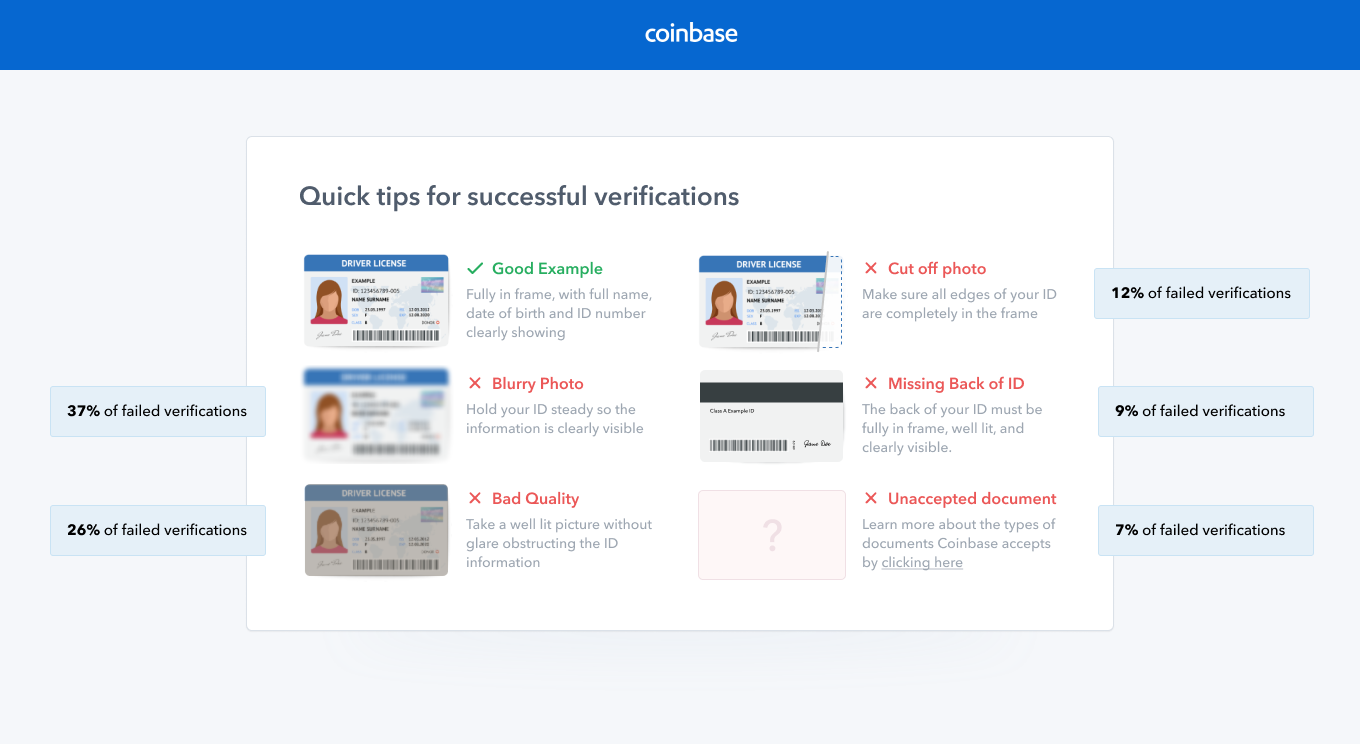
*Open image in a new tab for a larger version.
Related article(s):